Service websites / The right first step
Online booking vs contact form: which fits?
Let people book when the service and available time are clear. Ask for a request when the job needs a quote or review first. Some businesses need both, with different promises on each path.
Compare the paths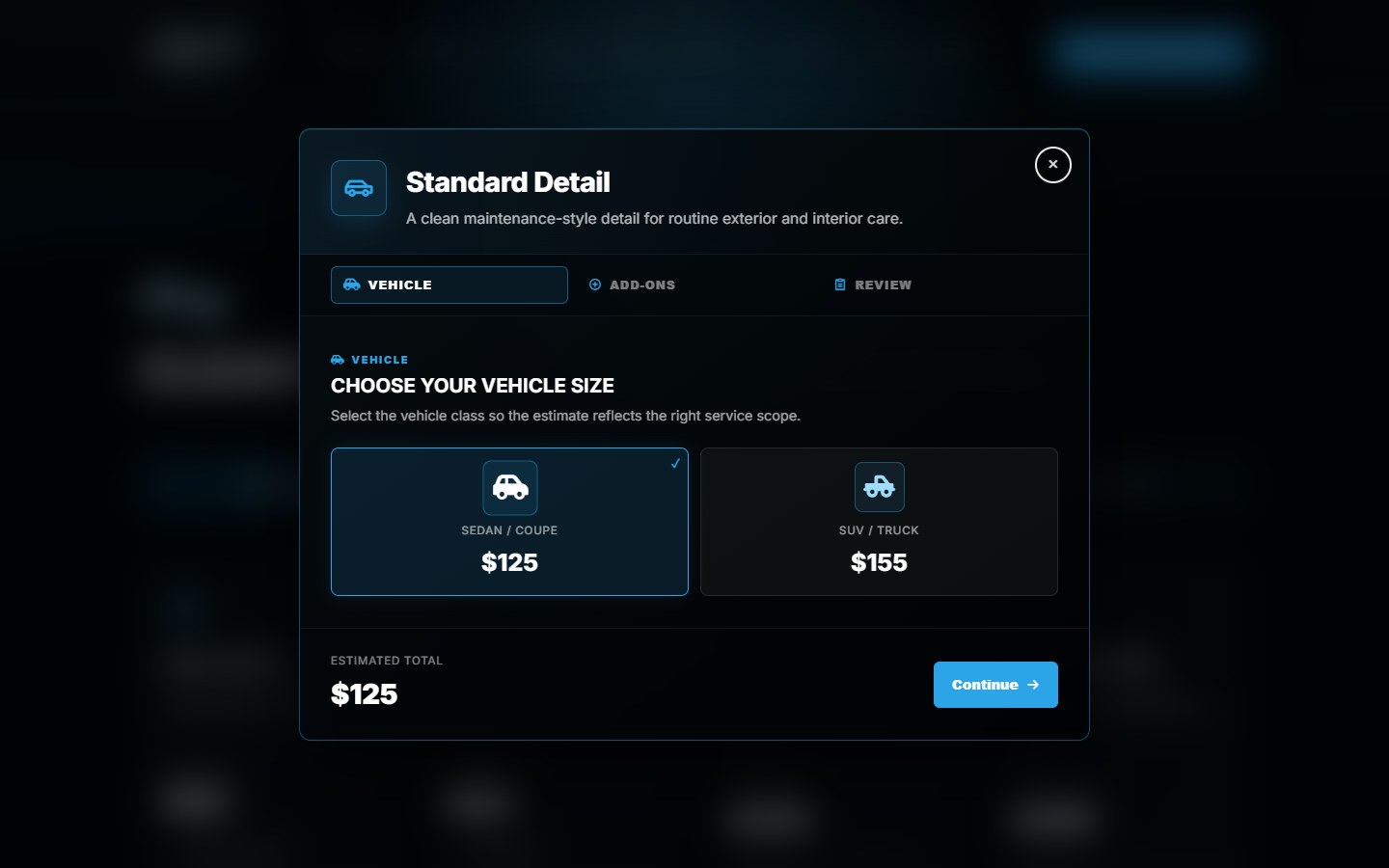
A booking is not every kind of request
What can you confirm before reviewing the job?
Choose the intake method around that question. A customer selecting a routine appointment is making a different decision from someone describing work you have not priced or scheduled yet.
| Path | Fits when | Customer outcome |
|---|---|---|
| Direct online booking | The service, duration, eligibility and real availability can be established before confirmation. | An appointment confirmed by the scheduling system, under the agreed booking rules. |
| Request to book | A customer can suggest an appointment, but someone must approve the job or time first. | A pending request. Make clear how approval will arrive and whether the time is held. |
| Contact or quote form | You need to review scope, photos, service area or requirements before offering a price or time. | An inquiry received for follow-up, not an agreed price or reserved appointment. |
These are workflow choices, not fixed labels for particular software. A booking tool may support approval requests, and a form can start a conversation that leads to scheduling later. The page should explain the actual outcome.
Match the method to the work
Make the easy jobs easy. Review the uncertain ones.
A defined appointment.
A repeatable service with known duration, customer requirements and availability can suit direct booking. Ask the customer to choose only from services they are eligible to book.
Before exposing a slot, account for the staff, equipment, travel or preparation time that affects the real schedule. A calendar that looks available is not enough if the business cannot deliver that appointment.
A job that needs an estimate.
If the work depends on condition, location, measurements or a conversation, a short inquiry can be the better first step. Ask for the details that let someone assess the request.
For example, a hypothetical detailing business might allow a standard service to be booked but review unusually heavy restoration work first. That is an intake example, not a claim about Canario's booking policies.
Canario Detailing / Recorded project example
Help people choose before the calendar.
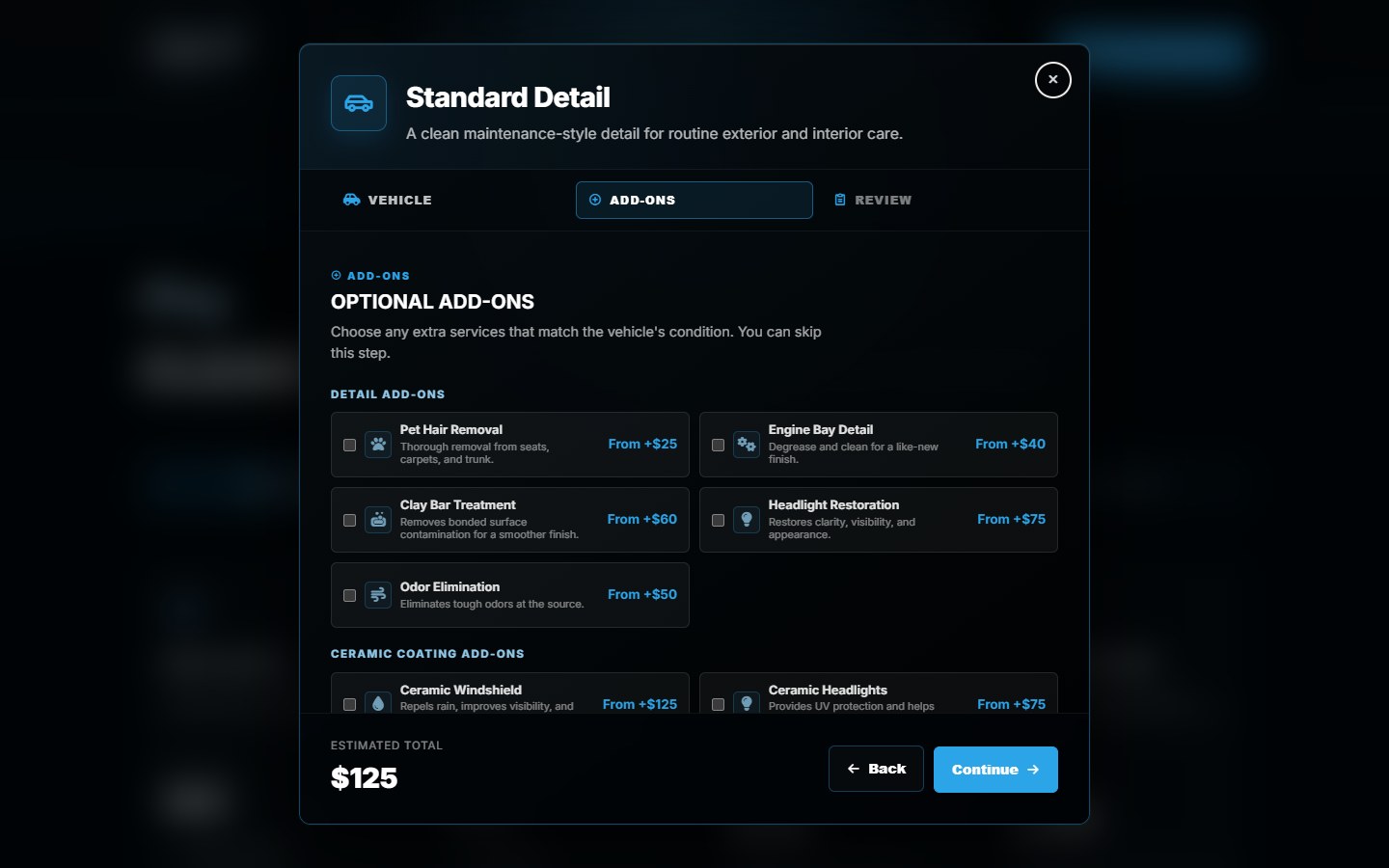
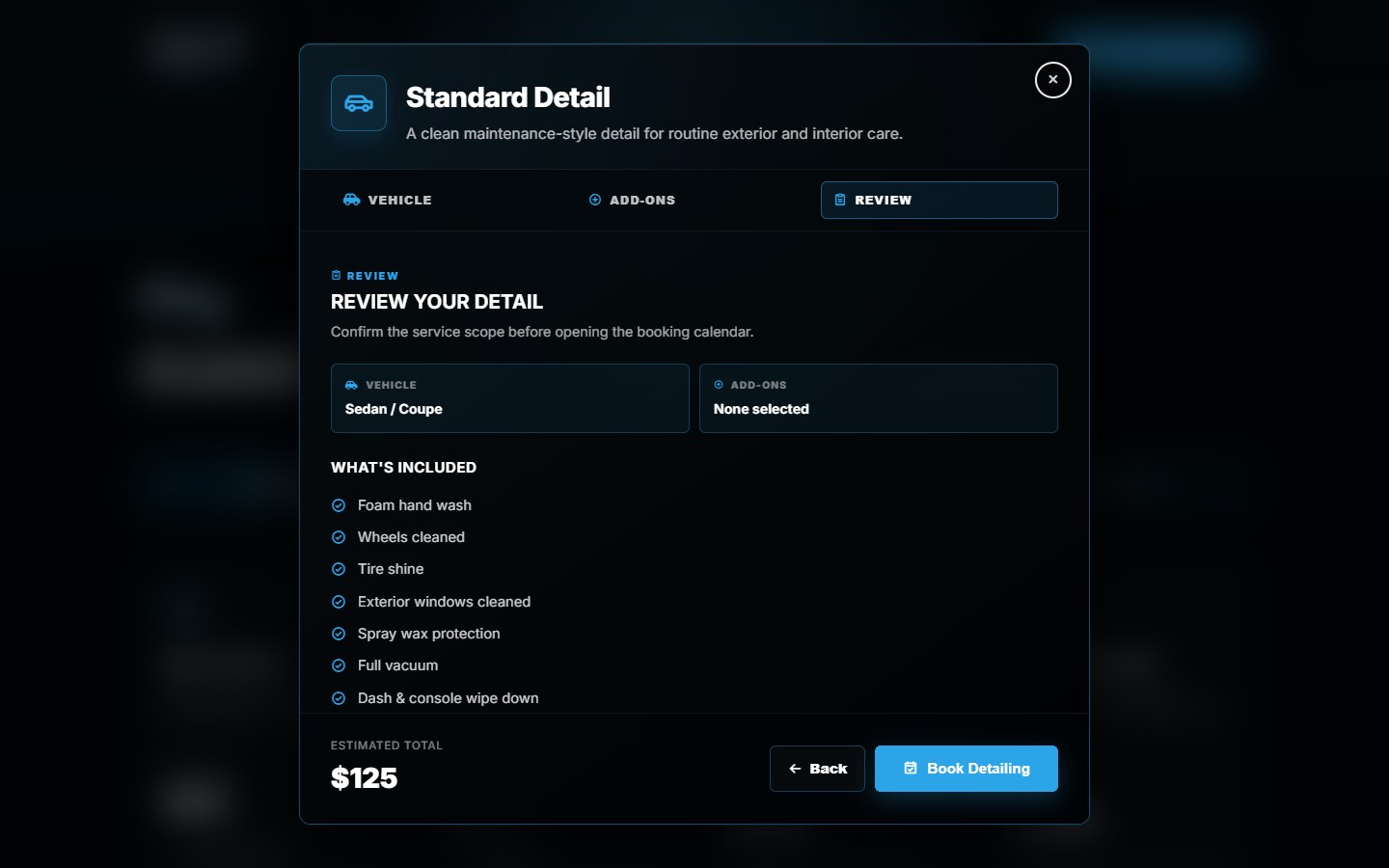
For Canario, DVS built package, vehicle and add-on choices before a Wix booking handoff. A review keeps the selected service, extras and estimated total together. Wix remains responsible for availability and final booking confirmation.
01 / Choose
The service and vehicle.
Present the relevant options before asking for a time.
02 / Review
The selected scope.
Keep the package, extras and estimate understandable.
03 / Continue
The booking handoff.
Pass into the intended service's scheduling route.
The screenshots show that selection interface, not a completed appointment or proof of increased bookings. See the Canario project for the implementation. If your current scheduler works, compare keeping Wix Bookings during a redesign before replacing it.
Offer two paths only when they do different jobs.
Direct booking and an inquiry form can coexist. Label them by their outcome: book a defined appointment, or request an estimate for work that needs review. Avoid two similar buttons that leave the visitor guessing whether either one reserves a time.
Keep the inquiry short enough to start the right conversation. A reply method, service needed, relevant location and a short description may be enough. Add photos or extra fields when they change the assessment, not just because the form allows them.
On the confirmation screen, say whether the request was received, awaits approval or is confirmed. Publish only a response window your team can actually support. Urgent work also needs an honest contact route; a form or empty calendar should not imply immediate availability.
Test the handoff, not just the button.
Choose the owner of availability. Identify the calendar, staff and resources that determine which times can be offered.
Define the request rules. List which services can be confirmed directly and which need approval, a quote or follow-up.
Keep the details together. Check that the intended service, selections and reply details reach the right destination without asking the customer to start again.
Check both sides of success. With approved test data, verify the customer message and the business's receipt. Test unavailable times, failed submissions and the approval path where applicable.
Count received inquiries, confirmed appointments and suitable jobs separately. A button click is not proof of any of them. If the project begins with a focused offer page, our landing page vs website guide helps decide how much of the surrounding site needs work.
Before choosing a tool
Booking or inquiry?
Should my service website have online booking?
Use it when the customer can choose the right service and the business can confirm a genuine available slot. If scope, duration or pricing needs review, begin with an inquiry or approval-required request instead. Different services can use different paths.
Is a request to book a confirmed appointment?
Not when approval is still required. The website and confirmation message should explain that it is pending, who reviews it and how the final answer arrives. Whether a requested time is held depends on the scheduling setup.
Can Wix Bookings require approval before confirmation?
Yes, Wix documents manual approval for appointments, not classes or courses. Its approval-required appointments cannot take online payment and must not be connected to a membership plan or package. Check the current restrictions for your service; the Canario screenshots do not establish that it uses this approval mode.
Do I need a custom booking system to collect more details?
Not necessarily. Check your existing scheduler's forms and service settings first. Wix supports service-specific booking forms and additional fields. A custom frontend is a separate scope for needs the existing setup does not adequately cover, not a requirement for every extra question.
Will online booking automatically bring more leads?
No. It can provide a useful next step for the right service, but visitors still need to find the business, understand the offer and be eligible to book. Evaluate received inquiries, confirmed appointments and job fit rather than assuming a new calendar will generate demand.
Start with how your business books work.
Share your site, service list and the step customers find difficult. We can scope the page, selector or connection that needs attention.
Sources and scope
Wix documentation checked October 24, 2026. The comparison is practical intake guidance, not a universal platform recommendation. Canario screens show recorded selection work; prices are not current quotes and no booking uplift is claimed.