5 website design mistakes to check before a redesign
A useful website review starts with observable problems, not a claim that a particular layout loses a fixed percentage of sales. These five checks help distinguish a focused fix from a larger redesign.
1. Keeping the useful content waiting.
A video, animation, or loading screen should not make the business description and next step disappear. Test the first visit and an immediate scroll on a slower connection. Check whether the words are present before the largest media files finish.
Reserve space for images and video, size assets for their display, and defer nonessential work where appropriate. Measure what is slow before blaming every plugin or the hosting plan. Google considers the overall page experience; no loading-time slogan establishes your site's abandonment rate.
2. Offering a next step that does not match its label.
Read each main button as a promise. Does booking open the relevant calendar? Does requesting a quote lead to a usable inquiry? Can someone send a message without being redirected back to the same page?
Choose the label around the actual action and give nearby alternatives a clear hierarchy. One phrase is not proven to convert better for every business. Inspect real inquiry outcomes before claiming a wording change improved sales. Also check the displayed email, phone number, services, and availability against the business's current details.
3. Making the form look finished while the workflow is incomplete.
A contact form needs understandable fields, useful validation, and a clear acknowledgement. An ordering flow also needs to retain the chosen product, quantities, artwork, and the amount that reaches the next system.
For The Direct Laser Source, DVS built a quantity interface alongside an artwork preview. The screenshot shows an available size, an unavailable size, and the combined unit count. Test those exceptions and the final order handoff; the preview alone is not the finished workflow.
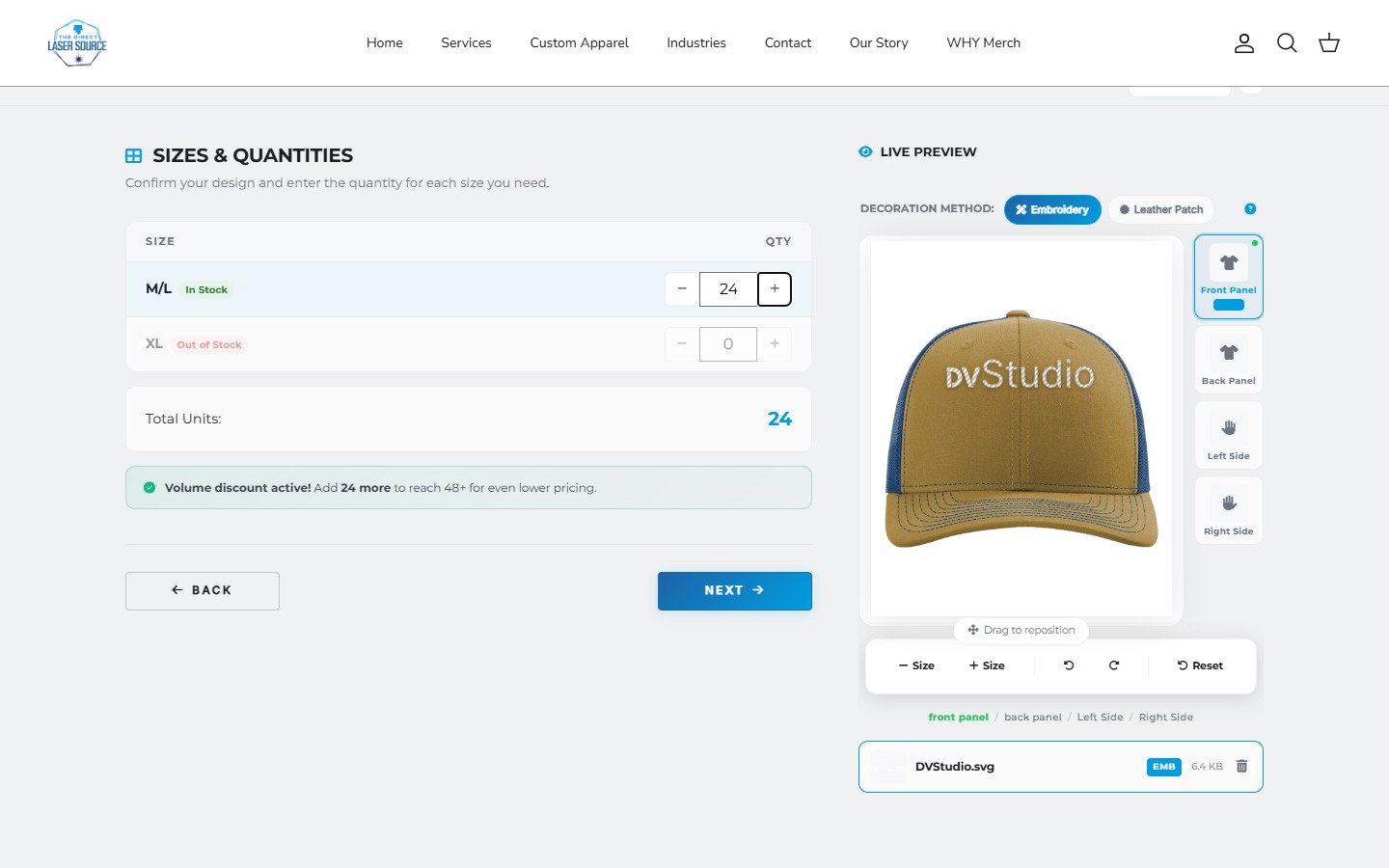
When product rules are the main problem, compare an options app with custom development before commissioning an entirely new store.
4. Testing the desktop layout and stopping there.
Use a phone to open the menu, read a full service description, change a product choice, and use the form keyboard. Check whether fixed headers, cookie notices, or floating controls cover what comes next. Repeat with enlarged text and slower loading.
Small controls, clipped content, and lost selections are actionable findings. They are more useful than declaring that every non-mobile-friendly site receives the same ranking penalty. Our mobile-first website checklist covers content, controls, performance, and the complete journey.
5. Buying a rebuild before identifying the gap.
A suitable theme is not automatically a bad website. First separate missing content, brand presentation, broken controls, and genuinely custom functionality. A focused change may solve the problem without replacing everything.
For a store, distinguish theme customization from a custom theme. For an existing site, record useful URLs and customer paths before changing them. Our redesign SEO checklist covers those launch checks.
Write down the problem, the acceptance test, and who maintains the result. Then agree a website redesign scope around the work required. Custom development is an option when the requirements justify it, not a default cure for every template.
Start with the part that needs to work better.
Share your current URL, the customer task, and where the experience breaks down.
Discuss your website