Shopify / Apparel ordering
Bulk apparel ordering on Shopify.
Let customers choose several sizes, add their artwork, and understand the total before they place an order.
One order, several sizes.
A standard size selector answers “which size?” A bulk order needs to answer “how many of each?” A quantity matrix keeps those choices together instead of making someone repeat the same product selection.
| Size | Quantity | Artwork |
|---|---|---|
| Small | 6 | Shared logo |
| Medium | 10 | Shared logo |
| Large | 8 | Shared logo |
| Total | 24 | One design |
Define what a minimum or discount applies to: the whole order, each garment, each color, or each decoration setup. Twenty-four items in the cart do not automatically mean twenty-four identical production units.
A useful total needs more than quantity.
Start with the selected garment quantities and size-specific prices. Then account for decoration method, artwork locations, quantity tiers, and any one-time setup charge. Make clear which charges are per item and which apply once.
In our Direct Laser Source implementation, size-aware garment prices and decoration rules feed the order calculation. Its cart builder also carries the size breakdown, garment, color, and decoration details alongside the order items. Those details matter as much as the preview.
Missing stock or prices need a clear response.
A supplier catalog is not a guarantee that every color and size can be ordered right now. Check the requested combination and distinguish unavailable stock from an inventory service that did not respond.
Do not silently charge a smaller-size price when a larger-size price is missing. The Direct Laser Source code includes size-pricing checks designed to prevent that fallback. A customer-facing message should explain what needs to change before continuing.
Artwork and production
Show the design. Preserve the details.
Uploading a logo is only the start. The customer should understand its placement, decoration method, and whether the preview needs approval before production.
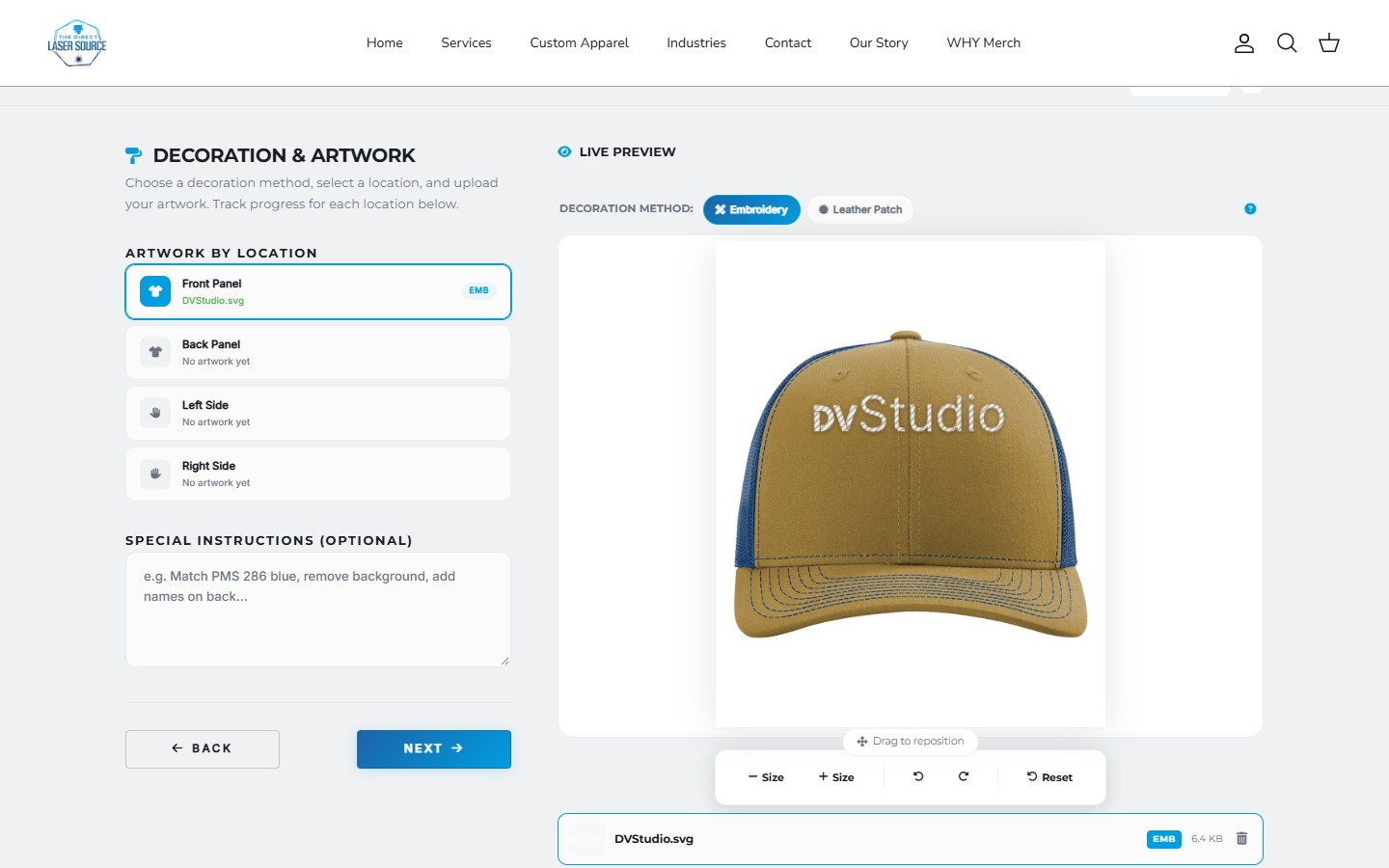
The Direct Laser Source editor demonstrates artwork placement and embroidery or leather-patch previews. A visual preview is not a guarantee of exact thread, material, or finished-product color.
Choose quote or checkout deliberately.
Use a quote flow when the artwork, availability, or final production cost needs review. Explain what the estimate includes and what happens after submission.
Use checkout when the selected configuration can produce a valid payable total and the order retains its production details. A file-upload field or a displayed estimate does not, by itself, establish either requirement.
Test an unavailable size, a missing price, a changed artwork location, a quantity-tier boundary, and the final order handoff. A smooth demo is useful; the exceptions determine whether the workflow holds up.
Does this need an app or custom work?
Not every bulk-order flow needs a custom builder. Existing apps advertise size/color quantities, artwork uploads, placement choices, and quantity discounts. Test a suitable app against your real catalog and theme first.
Custom work becomes relevant when supplier data, merchant-specific pricing, conditional choices, or the production handoff leave an important gap. Our app-versus-custom guide covers that decision separately.
Working through a custom order flow?
Bring a real order example, the systems involved, and the step that is not working.
Platform references: Shopify variant documentation and an example bulk apparel app listing. App features are vendor-described and must be checked for your proposed setup.